Skip to content

Swiss Activities app

All features of the Swiss Activities app

With the Swiss Activities app you buy official SBB tickets and the Swiss Travel Pass, plan hikes on swisstopo maps and take them offline, check MeteoSwiss weather and the rain radar, find and book experiences, plan your day with Alpi by Swiss Activities and keep your tickets with you on the go.

Train travel

Travel by train and buy rail passes

Buy the Swiss Travel Pass, find your next connection and work out whether a rail pass pays off, all in the app.

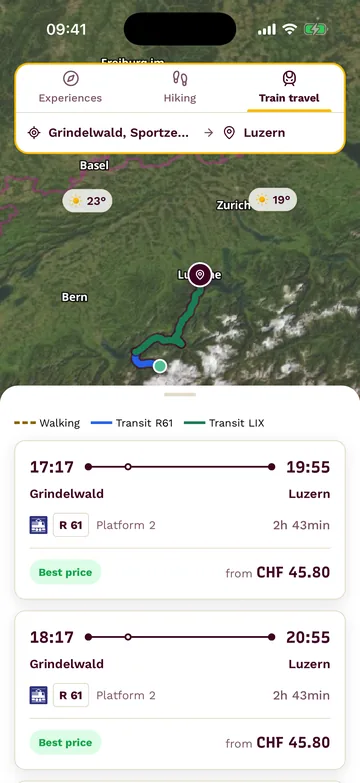
Next train connections from Grindelwald to Lucerne with platform, travel time and price

Swiss Travel Pass

Buy the Swiss Travel Pass or the Swiss Travel Pass Flex right in the app, no SBB login needed.

  1. 01In the «Trains» tab, choose the Swiss Travel Pass or the Swiss Travel Pass Flex under «Rail passes».
  2. 02Pick the travel date and travelers and pay in the app, no SBB login.
  3. 03The ticket is then in the app; saved tickets open offline too.
Train connection

Search train connections and book official SBB tickets right in the app.

  1. 01Enter «From» and «To».
  2. 02Compare the connections with platform, live delays and price.
  3. 03On «Book ticket», buy the official SBB ticket, on some trains as a «Saver ticket».

EasyRide and your SwissPass stay in SBB Mobile.

Rail pass finder

Work out whether a rail pass pays off for your trip or single tickets cost less.

  1. 01In the «Trains» tab, tap «Start the rail pass finder», choose your start and use «Add a stop» to enter your stops and nights.
  2. 02Say when you arrive, who is traveling, which class you travel in and whether you have a Half Fare card.
  3. 03Let it calculate: the finder shows whether a pass or single tickets cost less and what you save.
  4. 04Open the right pass with «View the pass».

Passes without verified route coverage are left out of the calculation.

Hiking

Plan, fly over and record your hikes

Plan on swisstopo maps, fly over in 3D beforehand, take the map offline and record as you go.

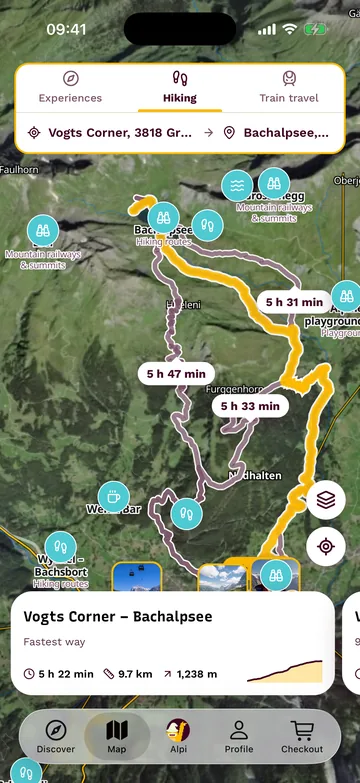
Planned hike from Grindelwald to Bachalpsee on the map, with alternatives and walking times
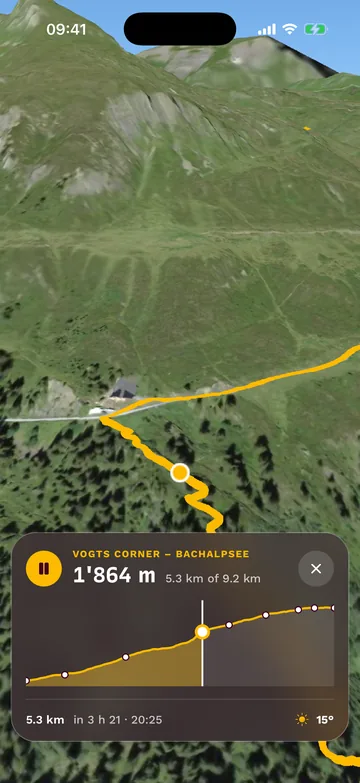
3D flight over the hike at Bachalpsee, with the elevation profile below

Plan a hike

Plan a hike on swisstopo maps, with elevation profile and walking time.

  1. 01Open «Plan a hike» and enter your start or your «Destination».
  2. 02Take a suggestion («Short», «Half day», «Day hike») or plan it yourself with «Add a stop», then «Calculate the hike».
  3. 03Check the elevation profile and walking time; saved hikes are under «My hikes».

Cycling and mountain bike routes are there as route pages, without the planner.

3D flight

Fly over a hike from the air before you set off, across swisstopo terrain.

  1. 01Open a hike and tap «3D».
  2. 02Drag along the elevation profile to scrub, and stop with the pause button.
  3. 03Tap the cross to return to the map.

Offline map

Download your hike's map to your phone so it works without a signal.

  1. 01In the hike, tap «Download» under «Take it offline».
  2. 02Or turn on «Download automatically before the start».
  3. 03«Offline ready» shows the map is on your phone.

Maps are downloaded per hike; automatically only for saved hikes and only on Wi-Fi.

Record a hike

Record your hike with GPS, with photos from along the way.

  1. 01On the map, under hiking, tap the red record button.
  2. 02Take photos along the way with the camera button.
  3. 03Finish with «Save and finish»: the hike stays under «My hikes».

The app needs your precise location; set to «Always», recording keeps going with the screen off.

My hikes

Find all the hikes you have planned or walked, all in one place.

  1. 01Open «My hikes» on the map or in your profile.
  2. 02Your hikes are grouped under «Planned» and «Walked».
  3. 03With an account, they are on all your devices.

Map layers

Switch the map and add slope steepness or the rain radar on top.

  1. 01Open «Map layers» on the map.
  2. 02Choose «National map» or «Satellite» as the base map.
  3. 03Add slope steepness or the «Rain radar» on top.

Slope steepness is no substitute for the avalanche bulletin, and the aerial image uses far more data.

Weather

Keep an eye on the weather

Weather

Check the weather for your place, from right now into the coming days.

  1. 01Open the weather for a place.
  2. 02Hour by hour from «Now», plus the forecast for the coming days.
  3. 03Sunshine, freezing level, gusts and pollen too.

The forecast comes from MeteoSwiss.

Rain radar

See where it is raining right now and where the rain is heading.

  1. 01Open the rain radar.
  2. 02Play it: first what was «Measured», then the «Forecast».
  3. 03Open the rain radar full screen.

Weather warnings

Get official MeteoSwiss warnings on your phone as push alerts.

  1. 01In your profile, open «Notifications» and switch on «Weather warnings».
  2. 02Under «Minimum warning level», choose from which level of danger you are warned.
  3. 03Add more places under «My places» with «Add place».

Weather warnings need an account. Without a current location you only get them for your saved places; outside Switzerland they are paused, except for those places.

Pollen alert

Get notified as soon as your pollen is in the air near you.

  1. 01Under «Notifications», switch on the «Pollen alert».
  2. 02Choose your pollen and the strength, for example «from moderate».

The pollen alert only runs during the pollen season and needs an account; it is based on readings from a pollen monitoring station near you.

Ideas and experiences

Find ideas, book them and add places

Find and book experiences near you, keep places for later and add the places that are still missing.

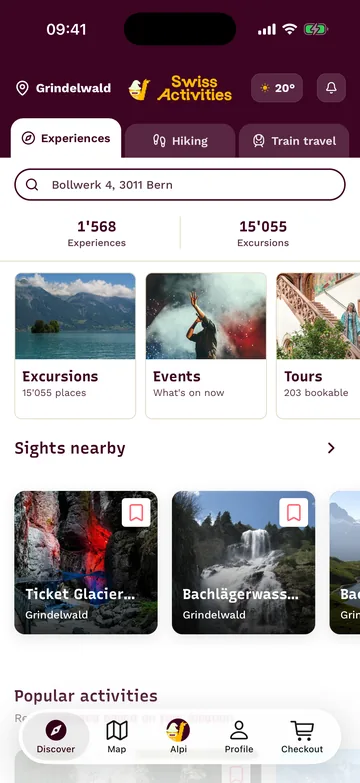
App home screen on the Experiences tab: themes and popular activities nearby

Experiences

Find experiences, mountain railways and day trips near you and book them straight away.

  1. 01Open the app: it suggests ideas near you.
  2. 02Check the date, meeting point and price.
  3. 03Book in a few steps; the ticket stays in the app.

Alpi Deals

Find activities with a discount running right now.

  1. 01Tap «Deals» to open «Alpi Deals».
  2. 02Filter by the size of the discount or view «All».

Deals are only there while promotions are running.

Ski lessons

Find ski courses for children and adults and book them.

  1. 01Open the ski course search and choose the place.
  2. 02Set who the course is for.
  3. 03Choose a group course or a private instructor, morning or afternoon.
  4. 04Book the right course straight in the app.

Favorites

Keep places and experiences for later.

  1. 01Save places and experiences; they are then in your profile under «Favorites».
  2. 02Sort them into your own lists with «Add to list».
  3. 03Pass a list on with «Share list».

Favorites and lists need an account.

Import from social media

Bring places from a TikTok or Instagram video into your «Favorites».

  1. 01Open the social media import in «Favorites».
  2. 02Paste a TikTok or Instagram link.
  3. 03Choose the places found and save them.

You need an account for this.

Add a place

Add a place that is missing from the app yourself.

  1. 01In your profile, add a new place under «My contributions».
  2. 02Enter the name, the kind of place, its location and photos.
  3. 03Submit the place.

Everyone sees it only after review; until then it shows as «In review» under «My contributions».

Search your photos

Match your photos from Switzerland to the right places.

  1. 01Under «My contributions», choose «Search your photos».
  2. 02Alpi suggests which place your photos belong to.
  3. 03Pick the suggestions and confirm with «Yes, submit».

Only on iPhone and iPad, with an account.

Alpi by Swiss Activities

Plan and book your day with Alpi

Tell Alpi what you have in mind: Alpi plans the day in the chat, and you book the tickets right there.

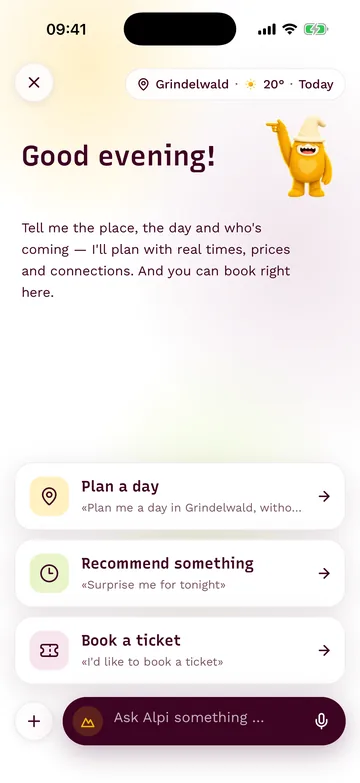
Alpi chat in the app with suggestions for planning and booking

Alpi by Swiss Activities

Have your whole day planned in a chat and book it right there.

  1. 01In the «Alpi» tab, tell Alpi where you are, who's coming and how much time you have.
  2. 02Alpi plans the day with real connections and live prices.
  3. 03Book the tickets right in the chat.

My day plans

Save Alpi's day plans and open them again later.

  1. 01In the chat, ask Alpi to «Plan a day».
  2. 02Save the day plan; you need an account for this.
  3. 03Open it again in your profile under «My day plans».

On the go

Keep your tickets and balance with you

My tickets

Keep the tickets you bought at hand, saved ones even without a signal.

  1. 01After you buy, your ticket is in the «Profile» tab.
  2. 02«Valid today» marks the ticket that is valid today.
  3. 03Saved tickets open offline too.

Signing out removes the tickets saved for offline use from the device; they come back when you sign in again.

Balance & vouchers

Top up your balance and keep track of your vouchers.

  1. 01Open «Balance» in your profile.
  2. 02Add money with «Top up».
  3. 03«Your vouchers» shows when each voucher expires.

Balance is only available with an account.

Messages and notifications

Set up notifications and read your messages

Notifications

Decide for yourself what comes to your phone and by email.

  1. 01Open «Notifications» in your profile.
  2. 02Switch weather warnings, «Morning weather», the pollen alert, and tips and offers from Alpi on or off individually.
  3. 03Turn «Deals & offers by email» on or off.

These settings need an account. Nothing reaches your phone unless notifications for Swiss Activities are allowed in your phone's settings.

Messages

Read the messages from Swiss Activities all together.

  1. 01With an account, open «Messages» in your profile.
  2. 02Read again what we have sent you.

Download it for free

For iPhone, iPad and Android smartphones.